The DNS: Domain Name System
The DNS allows one to find a computers IP number from it's domain name,
so that information can be exchanged with it, (so that a webpage can
be downloaded for example).
The word "Domain" comes from the way the system is layed out.
There are a huge number of computers on the internet, each with their
own IP number.
If this lookup scheme had to be managed from one single location, it
would be swamped with millions of queries,
and if it broke down, the internet would become unusable.
So the DNS was designed to distribute the work over a number of "domains".
The addressing scheme is split into domains and various sub-domains,
in a tree like structure.
Each domain is responsible for it's own sub-domains.
There are a relatively small number of top level domains. e.g:
com net org
int
These are international domains, and stand for
commercial, network (usually computer), organisation,
and international organisation respectively.
There are national domains to. ( they are also top level domains)
ie uk us jp
kr
Repubilic of Ireland, United Kingdom, United States of
America, Japan, Korea respectively
When you request a connection with "www.compapp.dcu.ie" for example,
your computer requests the IP number
from the local DNS server (its address is stored as part of your network
setup).
If it knows the IP number, it replys, otherwise is contacts the
"ie" DNS server.
However, the "ie" DNS server only knows about domains directly under
it in the tree,
so it passes on the request to the "dcu.ie" DNS server,
which passes the request on to the "compapp.dcu.ie" DNS server, which
should have the answer.
The IP number is then returned to the user, and a connection can be
established.
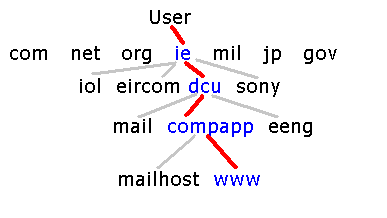
Thats the theory anyway, in practise, it can be more complicated.
Another possibility is that instead of the first DNS server making
the request for you,
It simply gives you the address of the next DNS server down the line.
This saves it having to wait for a reply from subsequent DNS servers.
This is important for a server receiving a lot of requests.
The InetAddress Class and DNS
The InetAddress Class in JAVA provides a simple interface to the DNS
system.
An Object is constructed as follows:
InetAddress address = InetAddress.getByName("your.domain.here.com");
It supplies the following methods:
equals(Object)
Compares this object against the specified
object.
getAddress()
Returns the raw IP address of this InetAddress
object.
getAllByName(String)
Determines all the IP addresses of a host,
given the host's name.
getByName(String)
Determines the IP address of a host, given
the host's name.
getHostAddress()
Returns the IP address string "%d.%d.%d.%d"
getHostName()
Returns the fully qualified host name for
this address.
getLocalHost()
Returns the local host.
hashCode()
Returns a hashcode for this IP address.
isMulticastAddress()
Utility routine to check if the InetAddress
is a IP multicast address.
toString()
Converts this IP address to a String.
Method listing Courtesy of java.sun.com
This class lets you construct an InetAddress object, using the domain-name
of your choice, and provides a method to acquire it's IP number.
When the getHostAddress() method is called, java sends out a DNS request
as described above,
and when a reply is received, returns the IP number as a String.
The other methods work in a similar way. |


